
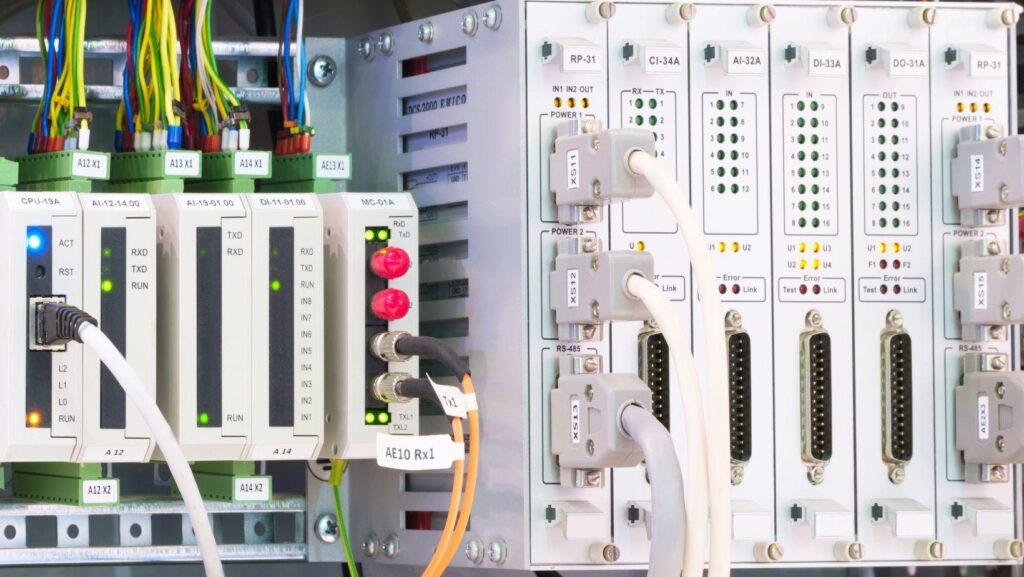
A dead I/O module at 2am costs more than the module. The line stops, the shift stands idle, and someone is on the phone trying to find a part number that nobody stocked.
Most plants have a maintenance plan for motors, bearings and belts. Far fewer have one for PLC modules and accessories, even though the control layer is what decides whether a small fault becomes a long stoppage. This article lays out a practical spares strategy that a maintenance manager can build in a few weeks, without a large budget or a new software system.
Why the control layer is the weak point
Electronic failures rarely announce themselves the way a worn bearing does. A card stops switching or a cable fails on one conductor, and the faults come and go. Intermittent faults are the most expensive kind. Technicians swap parts that are not at fault, restart the machine, and lose hours before the real cause shows up. A defined spares list shortens that loop, because the first fix is a known-good replacement rather than a search.
Start with a criticality ranking
You cannot hold spares for everything, so decide what matters. Walk each line and ask one question of every PLC rack: if this stops, what stops with it?
Rank assets in three groups:
- Line-stoppers: CPUs, power supplies, communication modules and any I/O card that feeds a safety or interlock circuit.
- Production-limiters: I/O cards serving a single station, where the line can run slowly or in manual while you repair.
- Nuisance parts: spare channels, non-critical analog inputs and anything with a workaround.
Line-stoppers get a spare on the shelf, no exceptions. Production-limiters get a spare if lead time is long. Nuisance parts get nothing until a failure history says otherwise.
Build the spares list around PLC modules and accessories
A spares list that covers only the CPU and a few cards misses where most call-outs actually begin. Build it in layers.
Modules. Hold one of each digital input, digital output and analog card type in use, plus the communication module and a spare power supply for each rack family. Where you run several I/O types, standardising on fewer part numbers cuts the shelf count considerably.
Racks and backplanes. A cracked rack or a damaged bus connector can take a whole station down. Keep one spare rack or backplane for each rack family in use, and inspect bus connectors whenever a module is pulled.
Connectors and pre-wired I/O cables. These are the parts that fail from vibration, repeated flexing and careless re-seating. Keep front connectors, terminal blocks and a few pre-wired I/O cables for each machine. DIN rail terminals and 24VDC power supplies belong on the same shelf, since they are the parts most often found at the root of an “unexplained” reset.
Programming and communication gear. Keep a programming cable, a memory module or card, and the right communication adapter in the maintenance toolbox. A replacement module is no use if nobody can load the program into it.
Record the details that make a spare usable
A part on the shelf is only a spare if it will work when fitted. Tag each item with the part number, the firmware or hardware revision where it matters, and the machine it belongs to. Store the current program backup alongside the hardware, and check that you can restore it.
Brand ecosystems add a wrinkle. A spare for an S7 rack will not help a ControlLogix cabinet, and the same applies to Modicon systems. Where a site mixes platforms, label the shelf by platform, not by part type, so the night shift does not have to guess.
Plan for obsolete and hard-to-find parts
Controllers outlive their product lines. Many plants run machines installed well over a decade ago, and some modules have been discontinued by the manufacturer. Waiting for a failure to learn that a part is no longer made is the worst way to find out.
Review the installed base once a year and flag anything the maker has marked end-of-life. For those items, choose one of three paths:
- Buy and hold enough spares to cover the machine’s expected remaining life.
- Plan a staged migration to a current module and budget for the rewiring and program changes.
- Qualify a source for hard-to-find parts before you need it, including a way to confirm the part is genuine.
Counterfeit and relabelled electronics are a real risk with older stock. Ask any supplier how they verify authenticity, and keep the paperwork with the asset record.
Choose your supply route before the breakdown
The sourcing decision belongs in the plan, not in the middle of an outage. A short checklist helps:
- Does the supplier carry the major controller families you run?
- Can they handle a bulk order for a shutdown or a new project without splitting it across vendors?
- Is stock held locally, and are the order cut-offs clear?
- Can they help with parts that have been discontinued?
For Australian maintenance teams, one option that covers these points together is RS, a PLC modules and accessories supplier listing PLC modules and accessories from brands such as Siemens, Schneider Electric, Omron, Phoenix Contact and Mitsubishi Electric, which suits plants that run mixed platforms. Buyers can also look at bulk ordering and project pricing for shutdown spares and automation upgrades, obsolete and hard-to-find module sourcing for ageing lines, and genuine parts with authenticity verification. On delivery, locally stocked items ordered before 5pm AEST on weekdays are delivered the next working day, though some regional areas take longer and Global Stock and Extended Range items take longer again. Free delivery applies on qualifying business orders.
Keep the plan alive
A spares strategy decays unless someone owns it. Assign a named person, review the list after every unplanned stop, and add any part that caused a delay. After a quarter of honest updates, the list reflects how your plant actually fails, not how a manual says it should.
Putting It All Together
Reducing unplanned downtime does not require new technology. It requires a ranked view of what can stop your line, a layered spares list covering modules, racks, connectors and cables, documentation that makes each spare usable, a plan for obsolete parts, and a supply route decided in advance. Do those five things and the next dead I/O card becomes a ten-minute swap instead of an overnight search.